We try our best to make it to your inbox, but sometimes there’s nothing we can do and emails go to your junk/spam folder instead. Here are instructions for how to tell your email client that our emails should not go to spam, based on your email host.
Gmail
Open the email in your spam folder and click the “Not spam” button:

More details:
Outlook/Hotmail
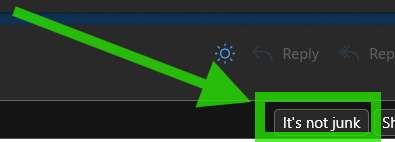
Open the email in your spam folder and click the “It’s not junk” button:
More details:
Yahoo
https://help.yahoo.com/kb/SLN15608.html
AOL
https://help.aol.com/articles/aol-mail-spam-and-privacy
Other Email Services
Try to look for a “not spam” or “email whitelist” feature in your email client. If you get stuck, reach out to us at support using the “Help” link in your group’s website footer.
